ROBAR - Integration
ROBAR enables seamless integration with any major ERP or similar enterprise system.
In a perfect world, a single enterprise software application would be able to address all business functions and processes. In the real world, however, it is simply not possible given the staggering diversity of business needs across an equally staggering number of vertical industries. Thus, while many ERP systems meet standard business requirements out-of-the-box, industry-specific needs typically require either expensive custom programming or additional software applications. This is especially true in the Life Sciences given the extensive regulatory constraints.
Since software utopia is clearly not an option, and custom programming is limiting and costly, the next best alternative is to utilize applications that enable seamless integration with core systems like ERP and WMS. It is also essential to work with solutions that allow advanced data management with minimal administrative overhead. In other words, if you can't have utopia, you can at least replicate the benefits through robust integration with the right 3rd-party applications. To that end, ROBAR includes a host of a powerful integration and data management features:
Integration:
| XML Interface: XML has become the de facto standard for sharing data among enterprise applications. Thus, the majority of leading ERP systems support XML (e.g. SAP, Oracle, BPCS, JD Edwards, etc.). ROBAR's XML interface is based on sharing data via secure network directories and pre-defined application "triggers." While this results in some data duplication, the overall benefits in terms of flexibility and ease of integration typically outweigh any drawbacks since the storage impact is negligible and the data is still securely maintained in the ERP with real-time updates in ROBAR. | ||
| Custom, Direct Interfaces: Prior to our transition to "pre-packaged" software, Innovatum built multiple interfaces to systems like SAP, BPCS and Oracle for custom development projects. Consequently, we have the experience and skill-set to build virtually any direct ERP interface in ROBAR that our clients may desire. However, we still recommend the standard XML interface since it enables seamless integration out-of-the-box without custom programming. It also ensures on-going compatibility with minimal impact if a client migrates to another ERP | ||
| ASCII Data Files: While XML is the ideal method of enterprise data transfer, ASCII-delimited text files - such as csv and tab-delimited - are still widely used for simple data sharing. Thus, ROBAR includes a powerful directory-monitoring tool for executing processes upon receipt of new ASCII data files. This is ideal for working with smaller partners or suppliers whose systems may not support XML, since one can easily create an ASCII data file in Excel. | ||

| Multiple Database Platforms: At the heart of the ROBAR system lies an enterprise-class database to store (and maintain if applicable): variable product data, label templates, language translations, graphics, system settings, security settings and comprehensive audit logs. In order to provide maximum flexibility, ROBAR supports Oracle, Microsoft SQL Server or MySQL as the back-end database platform. |
Data Management:
| Configurable Tables: ROBAR's table structure includes pre-defined homes for Product, Lot, Container, Facility and Template data. All ROBAR tables can be configured with administrator-defined field names to match internal nomenclature. Moreover, ROBAR's tables are configured with the appropriate relationships to enable optimal enterprise label management. | ||
| Extensive Query Options: Most Life Science manufactures need to label hundreds, or even thousands of SKU's, which can make it difficult to find the appropriate product records. Thus, ROBAR includes numerous query options to narrow search results quickly and easily. | ||
| Mass Updates: ROBAR's flexible query options also allow users to group common SKU's based on shared criteria and edit them en masse within a single Master Item. For example, if a logo changes for a particular product family, the change is made once within the Master Item, then automatically applied to the entire product family. It can even be configured to launch appropriate approval workflows when paired with the ROBAR Workflow Module. | ||
| Unicode-Compliant Translation Dictionary: ROBAR includes a fully Unicode-compliant translation dictionary to import and natively store certified translations in any international language, including double-byte character sets like Japanese Kanji and Chinese. The appropriate translations can then be merged with label templates at print time. This eliminates the need to manage non-Western languages as static graphics; resulting in more flexibility and improved printing performance. | ||
| Comprehensive Audit Log: Regulatory statutes like 21 CFR Part 11 require Life Science manufacturers to maintain a detailed history of all label related activity in the event of a product recall. Consequently, ROBAR retains a comprehensive log of all label printing activity, as well as any label system activity, period. | ||
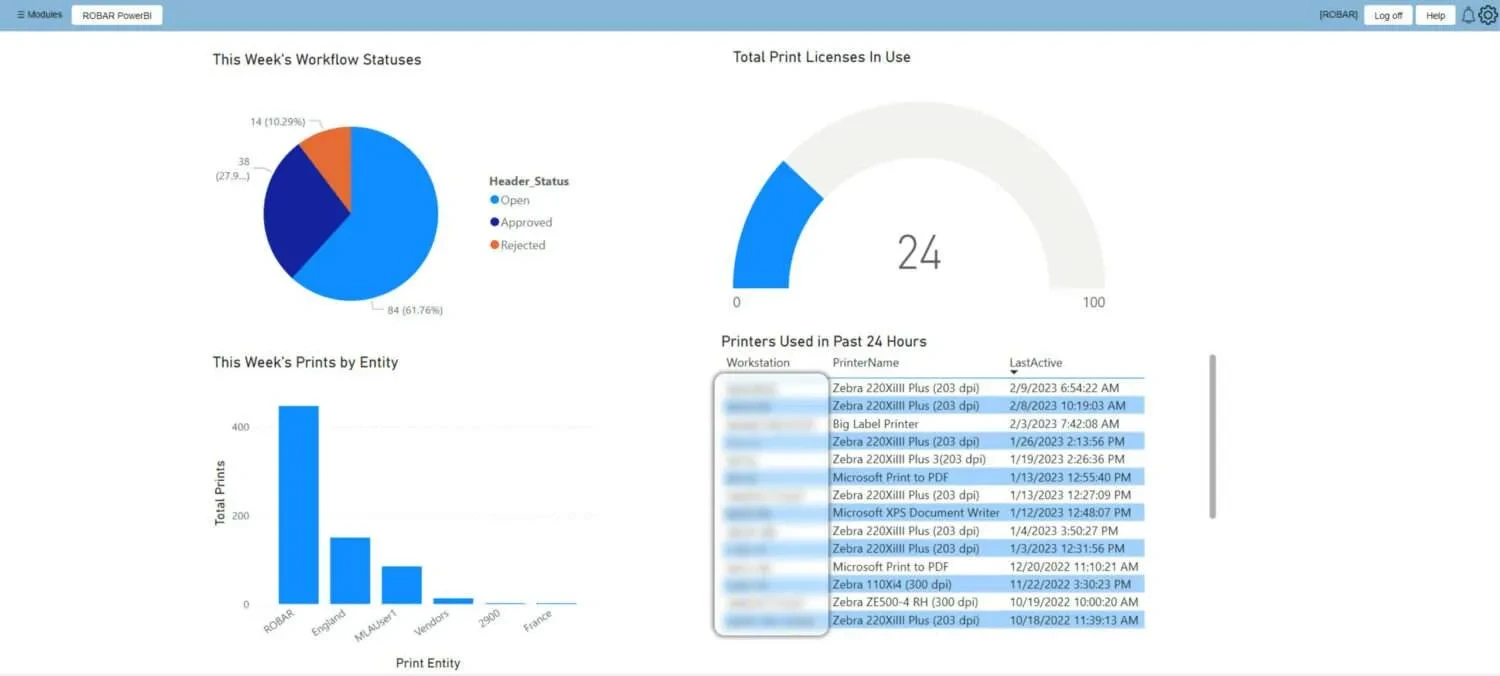
| Reporting: It is one thing to track and retain system-related data, but it is quite another to make that data readily accessible in a format that is useful to System Administrators, QA personnel and Auditors. To that end, ROBAR includes a robust reporting tool that allows users to define any number of reports for internal use. Moreover, ROBAR's use of standard relational databases means that it is also compatible with any 3rd-party reporting tool (e.g. Crystal Reports). |


Please contact us today for more details on how ROBAR can integrate with your critical enterprise applications. While we cannot promise software utopia, we have been replicating its benefits for leading manufacturers in the Life Sciences since 1993.